Sending too much, too soon from a new account is one of the quickest ways to land in spam: Google's sender guidelines tell senders to "increase sending volume slowly to avoid delivery problems." Gmail also asks senders to keep the spam rate shown in Postmaster Tools below 0.10% and never let it reach 0.30%, and Yahoo sets the same ceiling at 0.3%. Warmup builds sender reputation at a steady volume so mailbox providers learn to trust the inbox before you scale cold campaigns.
Quick answer: Go to Email → Warmup, select the account, and click Start Warmup. OutreachBox sends a fixed 10 warmup emails per day through its peer-to-peer network. There is no duration, starting volume, target volume, or increase rate to set. For cold campaigns, start around 5–10 emails per day per new inbox during warmup, ramp gradually, and keep roughly 20–50 emails per day per warmed inbox after warmup. OutreachBox caps campaign sending at 30 emails per day per account.
Before you start
Connect the mailbox and verify its authentication first. Know your provider limits and pause plans for large campaign increases.
Practical example
Review a new sender regularly while keeping outreach volumes conservative. If delivery errors or complaints appear, investigate the cause before increasing activity.
Check your result
Warmup does not repair an irrelevant list, missing authentication, or unwanted messages. Follow provider policies and inspect bounce details if problems continue after enabling it.
What email warmup does
OutreachBox warmup exchanges mail with other inboxes in the peer-to-peer network so the account builds a sending history:
- Build sender reputation.
- Improve deliverability.
- Avoid spam filters.
- Establish trust with email providers.
The warmup volume itself stays at 10 emails per day. It does not climb on a schedule. You ramp cold campaign volume separately: around 5–10 emails per day per new inbox during warmup, then gradually toward roughly 20–50 per warmed inbox.
How to start warmup
- Go to Email → Warmup.
- Select the account to warm up.
- Click Start Warmup.
The account joins the peer-to-peer network at a fixed limit of 10 warmup emails per day. Opens, replies, and moves out of spam are handled automatically. There is nothing to configure for duration or daily increase.
How to monitor warmup
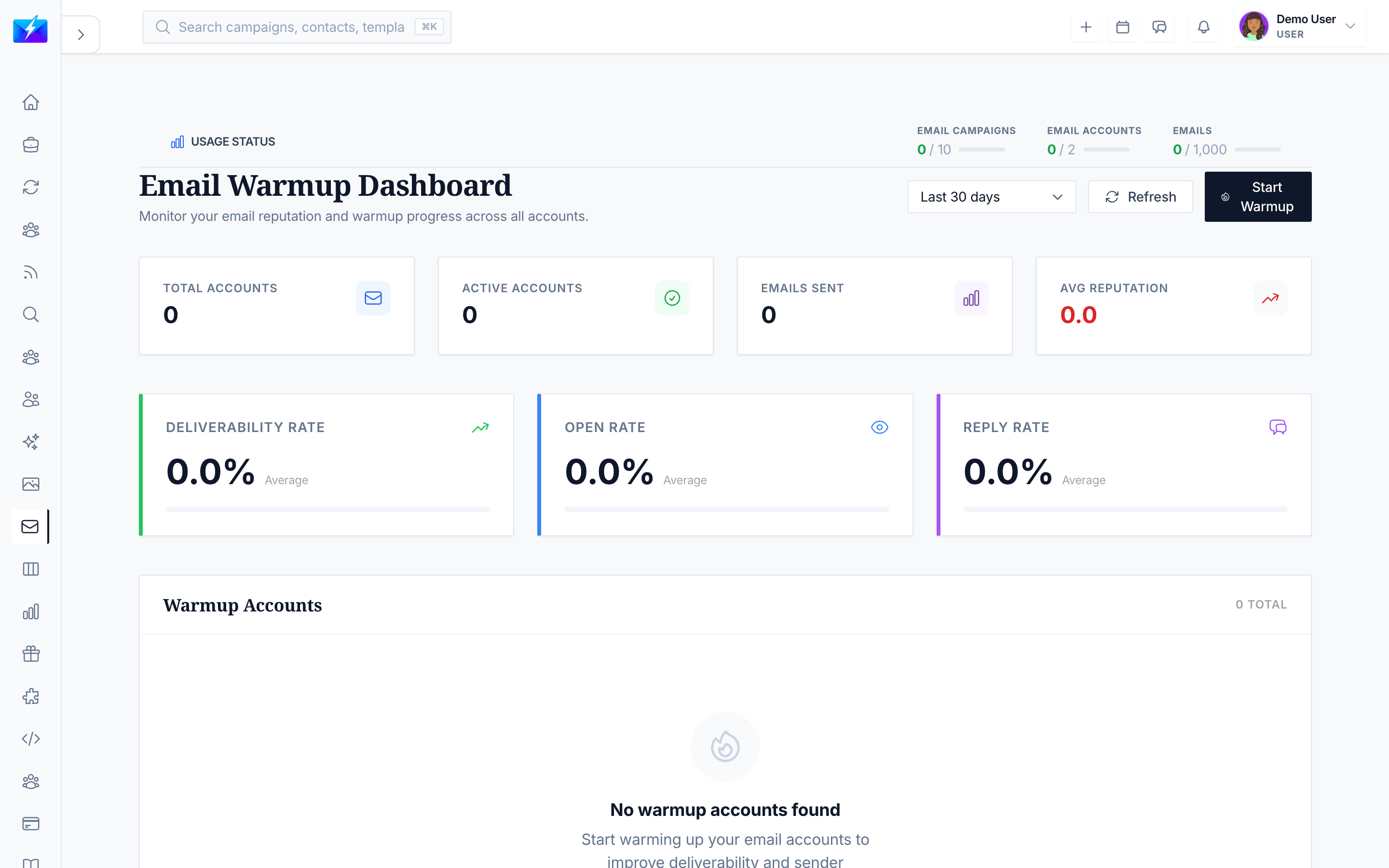
The warmup dashboard shows today's sends against the daily limit of 10, plus:
| Metric | What it shows |
|---|---|
| Sent today / daily limit | Warmup emails sent today, out of the fixed limit of 10 |
| Reputation | Sender reputation score |
| Deliverability | Share of warmup mail that is delivered |
| Open rate and reply rate | Engagement on warmup mail |
| Inbox placement | Inbox, promotions, spam, and recovered counts |
Watch bounce rates and spam placement while warmup runs. Google's sender guidelines FAQ points senders to its guidelines, including increasing sending volumes gradually and monitoring recipients' spam reports. The daily warmup limit does not change when those numbers move.
Best practices
- Start warmup before you plan to run campaigns.
- During warmup, keep cold sending around 5–10 emails per day per new inbox and ramp gradually.
- After warmup, keep roughly 20–50 cold emails per day per warmed inbox. OutreachBox enforces a maximum of 30 campaign emails per day per account.
- Add more warmed inboxes to scale, rather than pushing one inbox past a safe volume.
Sources
- Google, "Email sender guidelines"
- Google, "Email sender guidelines FAQ"
- Yahoo, "Sender Best Practices"
Checked October 26, 2026.
Frequently Asked Questions
How long does email warmup take?
There is no 30-, 60-, or 90-day setting. Run warmup for a few weeks before heavy cold sending. Start around 5–10 emails per day per new inbox during warmup, ramp gradually, and keep roughly 20–50 emails per day per warmed inbox after warmup. OutreachBox warmup stays at a fixed 10 warmup emails per day the whole time.
How many emails does OutreachBox warmup send per day?
A fixed 10 warmup emails per day per inbox. You cannot set a starting volume, a target volume, or a daily increase. Cold campaign volume is separate: start around 5–10 emails per day per new inbox during warmup, ramp gradually, and keep roughly 20–50 emails per day per warmed inbox after warmup. OutreachBox caps campaign sending at 30 emails per day per account.
Why is my deliverability still low during warmup?
Keep warmup running, review your sending practices, and watch bounce rates and spam placement. Deliverability improves as reputation builds. Do not jump cold volume ahead of that reputation.
Can I run campaigns while warming up?
Yes. Keep new inboxes around 5–10 cold emails per day during warmup and ramp gradually. OutreachBox still caps each account at 30 campaign emails per day.
Related articles
- How to Connect an Email Account
- How to Improve Email Deliverability
- How to Run a Cold Email Campaign
Warm up before you scale — sender reputation is earned over weeks, not in a volume spike.